In a nutshell: The official Telangana ePDS site has a public allocation report form and a Monthly KeyRegister Report form. Both sit under one menu and need no login. We opened the forms and read every option, but not the result tables.
- Where to Find the Allocation Report in Telangana EPDS
- Report 1: Allocation Report by Commodity, Month and Year
- Report 2: Monthly KeyRegister Report Explained
- What We Have Not Verified About These Telangana Reports
- Allocation Report or KeyRegister Report: Which One to Use?
- Step by Step: How to Run the Monthly KeyRegister Report
- Example: Reading an Allocation Report by Month and Year
- When the Allocation Report Will Not Answer Your Ration Question
Most ration card holders never look at these reports. They go to the shop, get their grain and leave. But if you are a ward member, a volunteer or just a curious neighbour, you may want to know what the system says was sent for a month. This post shows where the two forms are and what you can pick in them. This site is independent and not a government website.
Where to Find the Allocation Report in Telangana EPDS
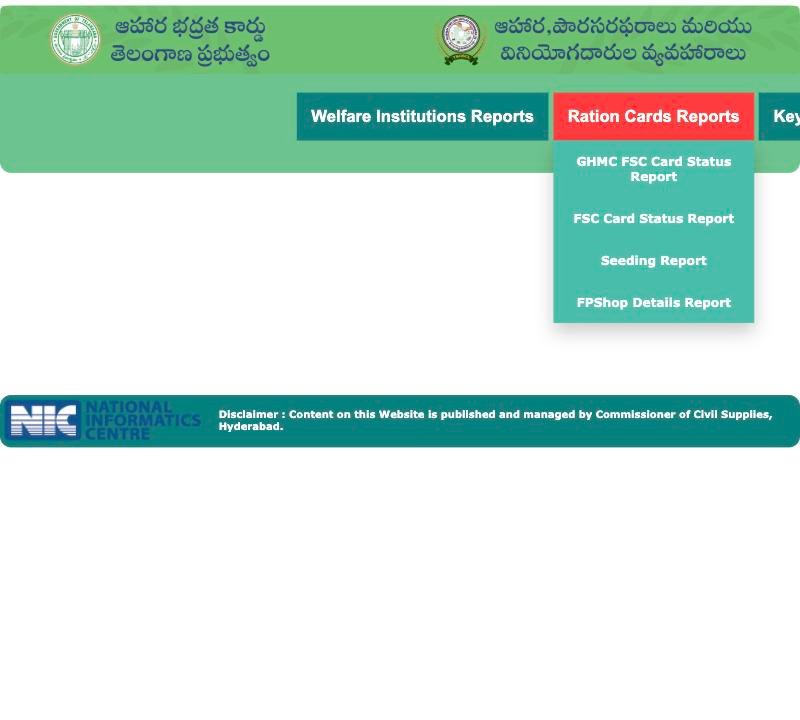
Open the official home page and go to the Reports menu. You will see a group named KeyRegister & Allocation Reports. It has two items: Allocation Reports and Monthly KeyRegister Report. Other groups in the same menu are the card status, seeding and shop details reports. The ePDS Telangana portal tour shows the rest of the home page.
 12
12- 1 Open Ration Cards Reports
- 2 Pick a report from the list
Report 1: Allocation Report by Commodity, Month and Year
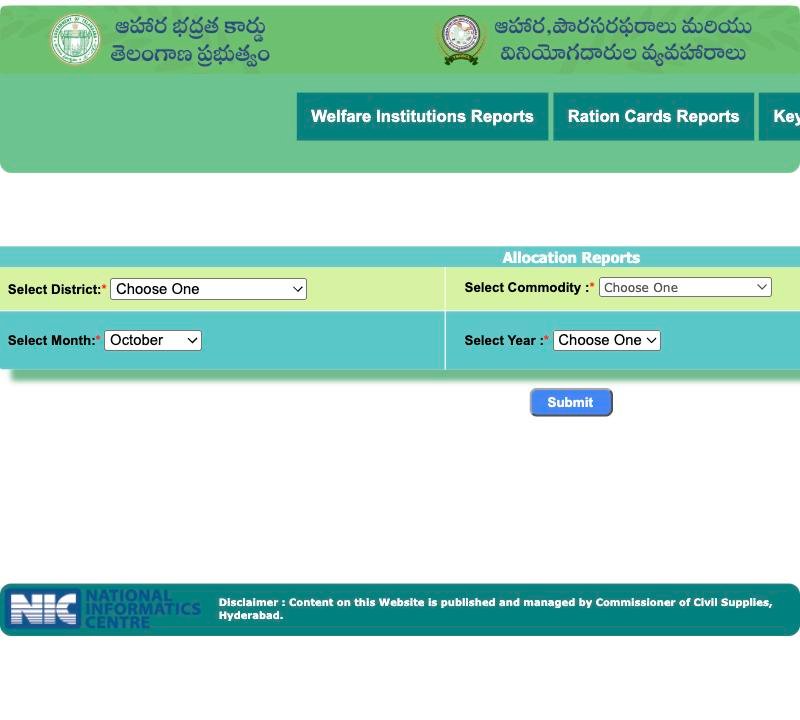
This form asks for four things.
- Select District: choose one of the 33 districts, or All.
- Select Commodity: the list has Rice, Wheat, Sugar, Kerosene Oil, Redgram Dal, Palmolein Oil, whole Meal Atta, Salt, Chilli Powder, Turmeric Powder and Tamarind.
- Select Month: January to December.
- Select Year: 2015 to 2026.
Then press Submit. Note one thing. A name in the dropdown does not mean that item is given at shops today. The list may carry old items too. Your own shop's stock is what counts.
 12345
12345- 1 Choose district or All
- 2 Choose commodity
- 3 Month
- 4 Year
- 5 Press Submit
Report 2: Monthly KeyRegister Report Explained
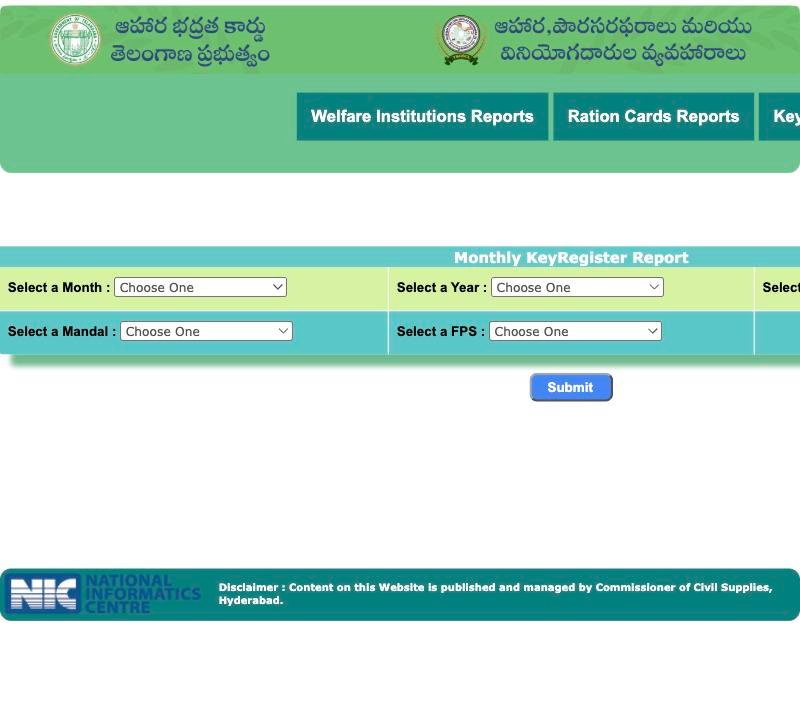
This form goes down to the shop. It asks for a month, a year (2015 to 2026), a district (or All), then a mandal, then a fair price shop. The mandal list fills after you pick the district. The shop list fills after you pick the mandal. Both have an All option.
So the second form is built to get to one shop in one mandal. The first looks like a district-level view by commodity. That is our reading of the forms, not something the portal states.
What We Have Not Verified About These Telangana Reports
We did not open the result tables of either report. So we cannot tell you which columns they show, or what numbers a month gives. Please do not trust any blog that quotes such figures without a date.
The word KeyRegister is also not explained on the portal pages we saw. A ration card result has a field called KeyRegister Sl.No, so the word is clearly part of the card system. But we have not verified its exact meaning. If you need to know, ask the Civil Supplies office.
Allocation Report or KeyRegister Report: Which One to Use?
Use this table to choose. The right column says what the form is built to do, judging by its fields.
| Your question | Try this form | Why |
|---|---|---|
| How much rice was allocated for my district in a month? | Allocation Reports | The form is built around district, commodity, month and year |
| Was sugar or salt ever on the list for a year? | Allocation Reports | Both appear in the commodity list; results not checked |
| Shop-wise register for one month | Monthly KeyRegister Report | The form lets you pick district, mandal and shop |
| Where is my fair price shop and is it active? | FPShop Details Report | See the shop details report guide |
| How many cards are there in my district? | FSC Card Status Report | See the district-wise card report guide |
Step by Step: How to Run the Monthly KeyRegister Report
- Open the official portal home and point to Reports.
- Click Monthly KeyRegister Report under KeyRegister & Allocation Reports.
- Choose the month and year.
- Choose your district. Wait for the mandal list to fill, then choose the mandal.
- Choose the fair price shop, or leave it on All.
- Press Submit.
Do not type any personal detail anywhere. These forms use dropdowns only.
 12345
12345- 1 Month
- 2 Year
- 3 Mandal
- 4 Fair price shop
- 5 Press Submit
Example: Reading an Allocation Report by Month and Year
Take Lakshmi, who runs a small tiffin stall in Warangal. Her neighbours say the shop gave less rice last month. She cannot prove anything. She can open the Allocation Reports form, pick her district, Rice, the month and the year, and see what the system lists. She would then compare it with what her shop says. If the two do not match, she should not accuse anyone. She can ask the shop owner politely, and then raise it with the helpline. Our post on shop refusals has some tips for that conversation.
When the Allocation Report Will Not Answer Your Ration Question
These are public summary reports. They do not tell you why your fingerprint failed, or whether your card is active. For a fingerprint problem, read the eKYC and biometric failure guide. For the status of one card, use the card search on the home page.
Frequently Asked Questions
Where is the allocation report on the Telangana ePDS site?
Go to the Reports menu on the official home page. Under KeyRegister & Allocation Reports you will find Allocation Reports and Monthly KeyRegister Report. Both are public, and neither asks for a login or personal details.
Which commodities can I choose in the allocation report?
The dropdown lists Rice, Wheat, Sugar, Kerosene Oil, Redgram Dal, Palmolein Oil, whole Meal Atta, Salt, Chilli Powder, Turmeric Powder and Tamarind. A name in the list does not mean the item is distributed now.
Can I see old years in the Telangana allocation report?
The year dropdown runs from 2015 to 2026. We checked the form only, not what each old year shows. Results for older months may be empty or different, so check the output itself.
What does KeyRegister mean on the ration portal?
We have not verified the exact meaning. The portal does not explain it on the report page. A card result also has a KeyRegister Sl.No field. For a clear answer, ask the Civil Supplies office.
Can I check my own shop's monthly report?
The Monthly KeyRegister form lets you pick district, mandal and fair price shop for a month and year. We have not opened the result, so we cannot say what it lists. Try it and compare with your shop.
Do I need Aadhaar or OTP to open these reports?
No. Both forms use dropdowns and a Submit button. Nobody should ask you for Aadhaar or an OTP to view them. If a page asks for either, you are probably not on the official site.
Similar guides
FPShop Details Report Telangana
Use the FPShop Details Report Telangana to look up fair price shops by district and office, learn what FPShop No means and what to ask your dealer.
One Nation One Ration Card Telangana
Shop refused your ration away from home under One Nation One Ration Card in Telangana? Record the refusal, check your card and report it with this script.