In a nutshell: EPDS Telangana is the state's online portal for ration card (Food Security Card) services. Most families need just one menu item, FSC Search, to check a card, an application or a rejected request. The same portal also shows public district reports, a Deepam search page and a link to the grievance system. This guide walks through each part in the order you will meet it.
- What Is EPDS Telangana?
- EPDS Telangana Official Website: How to Reach It Safely
- EPDS Telangana Home Page Menu Explained
- EPDS Telangana Ration Card Status: Which Search Should You Use?
- Public Reports on the Telangana Ration Card Portal Without Login
- EPDS Telangana Login: Who Is the Sign-In Box For?
- Deepam Search on the Telangana EPDS Portal
- Grievance Portal and Helpline 1967 for Ration Card Complaints
- Mobile Apps and Other Services on the EPDS Portal
- Who Can Get a Food Security Card (Ration Card) in Telangana?
- Documents Families Keep Ready for a Telangana Ration Card
- Common EPDS Portal Problems and Quick Fixes
- Safety Tips While Using the Telangana EPDS Portal
What Is EPDS Telangana?
EPDS stands for Electronic Public Distribution System. In simple words, it is the computer system behind the ration shops of Telangana. The website you open in your browser is the public face of that system.
At the bottom of every page the portal says that its content is published and managed by the Commissioner of Civil Supplies, Hyderabad. That line tells you who runs it. We do not. This website, FSC Search, is an independent guide that explains the portal in plain language, and it is not connected with any government body.
Think of EPDS Telangana as a notice board plus a few forms. You can look up facts. You cannot change anything on it. To apply for a card, correct a name or add a family member, you still go through MeeSeva or the Civil Supplies office, and then you come back to EPDS Telangana to track the result.
EPDS Telangana Official Website: How to Reach It Safely
The official Food Security Act portal sits at epds.telangana.gov.in/FoodSecurityAct. Before you type anything on any page, check two small things.
- The address ends in .gov.in or .nic.in. Look-alike websites copy the green design but use a different address.
- The footer names the Commissioner of Civil Supplies, Hyderabad. A copied page can fake this line too, so trust the web address first and the footer second.
When the home page opens, a popup with a Telangana Rising picture may cover the screen. Close it with the small cross at the top right. The page is also built for Chrome; the home menu itself has a link called Download Google Chrome Browser Settings, so if a menu does not open on your phone, switch to Chrome and try again.
EPDS Telangana Home Page Menu Explained
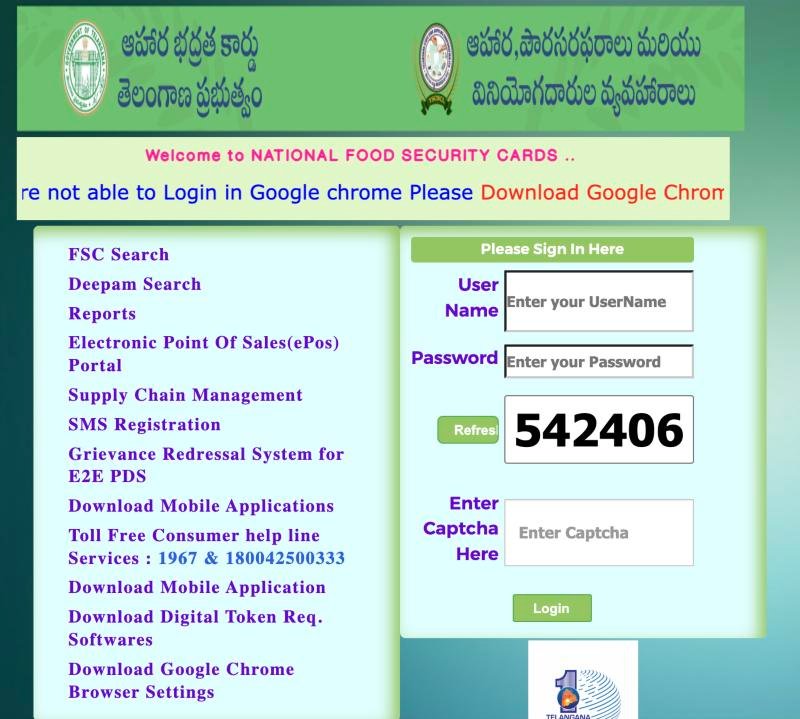
The left side of the home page is a list of links. The right side has a sign-in box with a captcha. We will come back to that box in a moment. First, the menu.
 12
12- 1 Click FSC Search
- 2 Helpline shown on the portal
| Menu item (as written on the portal) | What we know about it |
|---|---|
| FSC Search | Leads to the ration card searches: FSC Application Search and Status of Rejected Ration Card Search. A separate address opens FSC Ration Card Search. Covered below. |
| Deepam Search | Opens a page called Deepam Application Search with one field, FSC No. See the Deepam section below. |
| Reports | Public reports on cards, seeding, shops and allocation. See the reports section. |
| Electronic Point Of Sales (ePoS) Portal | A separate link. ePoS is the machine at the ration shop. We have not checked what this portal contains. |
| Supply Chain Management | A separate link. We have not checked what it contains. |
| SMS Registration | A separate link. We have not checked what it contains. |
| Grievance Redressal System for E2E PDS | Opens the complaint portal (IGRMS). See the grievance section. |
| Download Mobile Applications | A download link. Take apps only from the store listing the portal names. |
| Download Digital Token Req. Softwares | A download link for software. We have not checked who needs it. |
| Download Google Chrome Browser Settings | A help link for Chrome users. |
The home page also prints a toll-free consumer helpline: 1967 and 1800 4250 0333, exactly as the portal shows it.
EPDS Telangana Ration Card Status: Which Search Should You Use?
This is the part most people come for. There are three official forms, and each one answers a different question. None of them has a box for Aadhaar number or mobile number, so do not waste time looking for one.
1. FSC Ration Card Search: Does My Card Show Up?
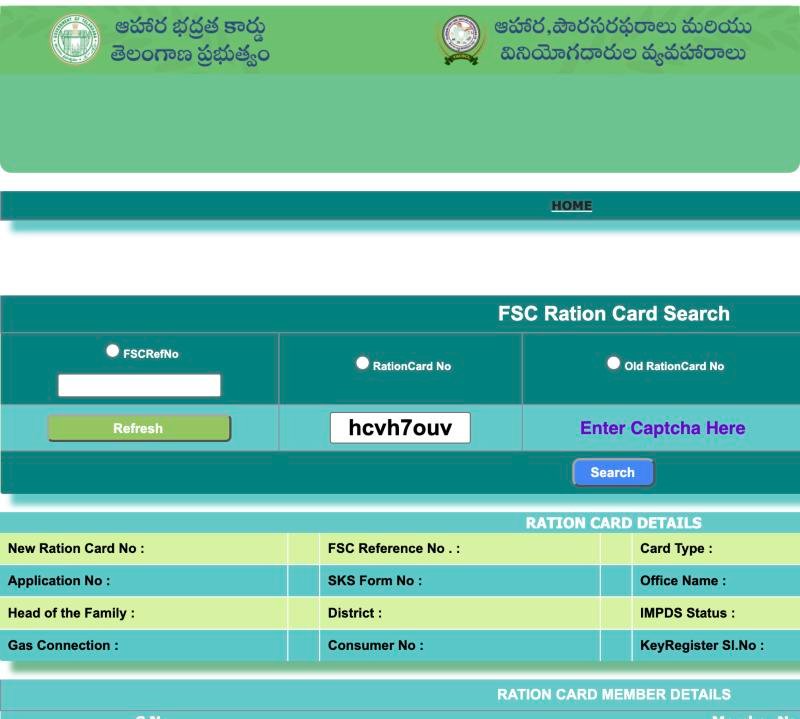
Use this when you hold a card number. Choose one of three options, FSCRefNo, RationCard No or Old RationCard No, pick your district, type the captcha and press Search. The result lists the card details, the shop number and the family members.
 123456
- 1 Choose FSCRefNo and type it
- 2 or RationCard No
- 3 or Old RationCard No
- 4 Type the captcha shown
- 5 Press Search
- 6 Card details appear here
2. FSC Application Search: Where Is My Application?
Use this when you applied and hold a receipt. Pick the district, choose MeeSeva No or Application No, and read fields such as Application Status, Current RC Status and Pending At. Our page on FSC application search by MeeSeva number explains every field.
3. Status of Rejected Ration Card Search: Why Was It Refused?
Use this when a request was turned down. It takes one field, RationCard No, and shows the reason against each member. Then read rejected ration card reasons and fixes.
If you want the whole walk-through with photos for all three, the FSC search home guide is the best place to start.
Public Reports on the Telangana Ration Card Portal Without Login
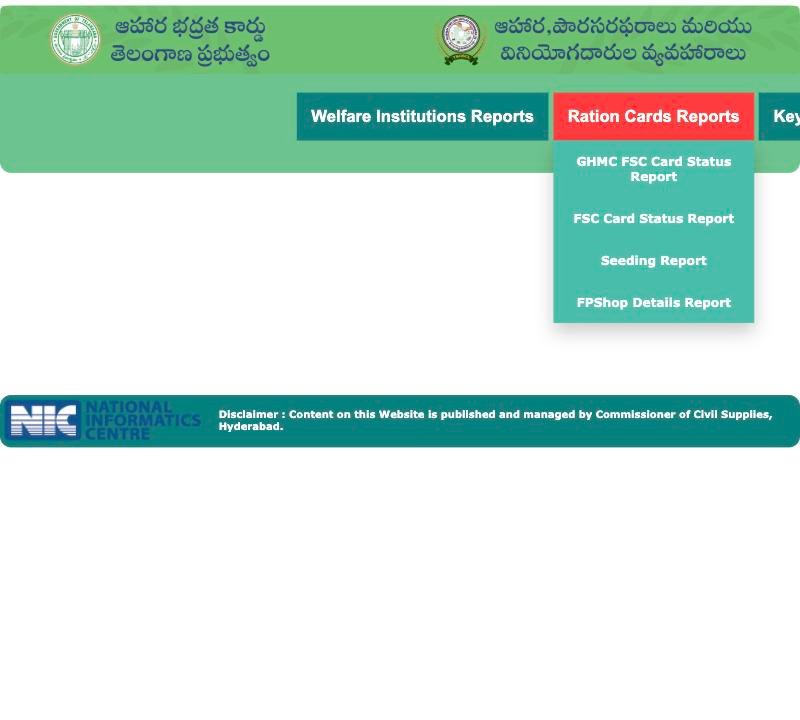
Click Reports on the home page and a second menu appears. Nobody asked us to sign in to open these pages. They are meant for anyone who wants district-level facts.
 12
12- 1 Open Ration Cards Reports
- 2 Pick a report from the list
| Report | What it is | Read more |
|---|---|---|
| FSC Card Status Report | District-wise count of ration cards and members, split into NFSA and State columns | FSC card status report explained |
| Seeding Report | District-wise count of cards with Aadhaar, bank and mobile details linked | Seeding report explained |
| FPShop Details Report | A form with District, Office and FPShop Status | FPShop details report |
| Allocation Reports and Monthly KeyRegister Report | Forms with month, year, district and, for the register, mandal and shop | Allocation and KeyRegister reports |
| GHMC FSC Card Status Report, Welfare Institutions Report | Also listed in the menu. We have not opened them. | - |
These reports are statistics. They do not show your card. For your own card, go back to the three searches above.
EPDS Telangana Login: Who Is the Sign-In Box For?
The right side of the home page shows a box with a user name, a password and a captcha. It is an official sign-in box. Every public search in this guide works without it, so an ordinary family never needs to type anything there.
- Do not enter your Aadhaar number or any personal password in that box.
- If a stranger asks you to log in "to fix your card", walk away.
- If a screen asks for a login to do a normal card search, you are probably on a copied website.
Deepam Search on the Telangana EPDS Portal
Deepam Search is the second item in the menu. It opens a page named Deepam Application Search, and the page asks for one thing: the FSC No. The page does not explain the scheme, and we did not type any card number into it, so we cannot tell you what the result shows. If you are chasing a gas connection linked to your card, ask your gas agency or the Civil Supplies office. Details are in our short post on Deepam search.
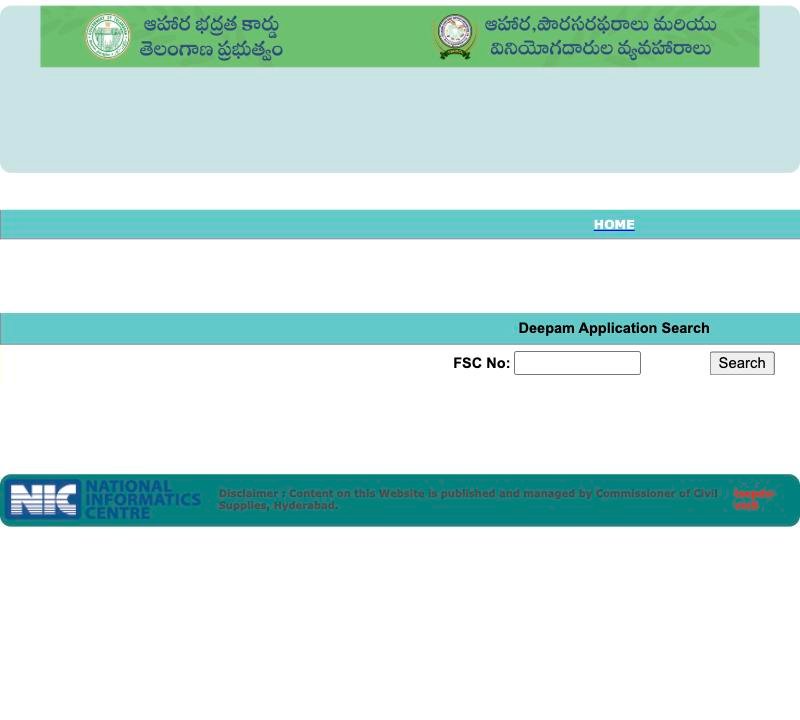 12
12- 1 Type the FSC No
- 2 Press Search
Grievance Portal and Helpline 1967 for Ration Card Complaints
If something goes wrong at the ration shop, the right place to complain is not a random website. The home menu link Grievance Redressal System for E2E PDS opens the Integrated Grievance Redressal Monitoring System (IGRMS). The page says citizens can lodge grievances about the Public Distribution System there, and that a call centre answers calls to 1967 round the clock.
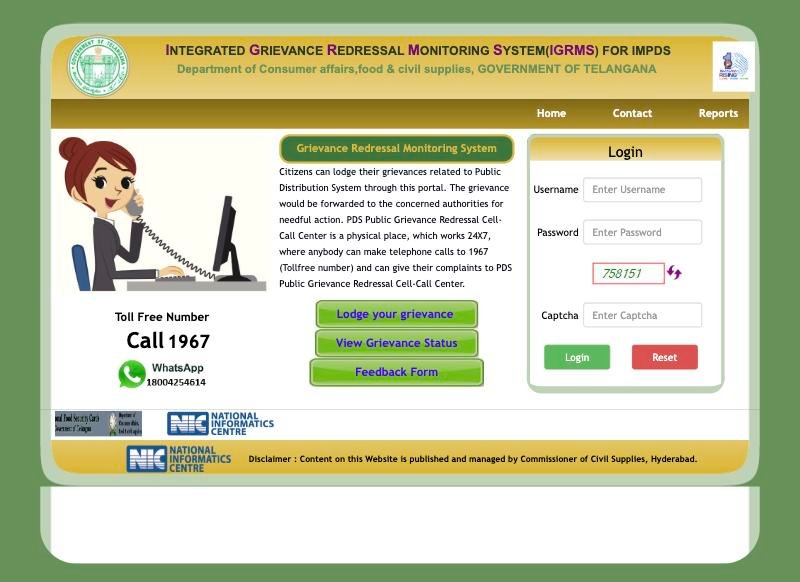 1234
1234- 1 Lodge your grievance
- 2 View grievance status
- 3 Toll-free 1967
- 4 Staff login box: not for the public
The three buttons on that page are Lodge your grievance, View Grievance Status and Feedback Form. The login box on the same page is for staff. Our step-by-step post on a ration card complaint in Telangana shows what to note down before you call or click.
Mobile Apps and Other Services on the EPDS Portal
The home page has a Download Mobile Applications link, an ePoS portal link, a Supply Chain Management link and an SMS Registration link. We have not opened them, and we have not verified the names of any app. If you want an app, use only the store listing that the official page names, and never install a file sent to you on WhatsApp.
Who Can Get a Food Security Card (Ration Card) in Telangana?
This is decided by the state government, and the rules can change, so we do not list income limits. In general, a card is for households that meet the state's criteria and live in Telangana. Ask the Civil Supplies office or a MeeSeva centre for the current rules before you apply. If you already have a card, you do not need to re-apply for small changes. Read about name and address correction and adding a family member instead.
Documents Families Keep Ready for a Telangana Ration Card
The exact list depends on the service, so confirm it before you go. Most families carry:
- identity proof of the head of the family and each member,
- address proof of the household,
- the old ration card and its number, if there is one,
- a birth or marriage paper when a baby or a spouse is added,
- a phone photo of every paper as a backup.
Common EPDS Portal Problems and Quick Fixes
| Problem | Try this first |
|---|---|
| Search says no record | Check the district and number type, then read application status data not found |
| Card exists but is missing online | Ration card missing in database |
| Application stays pending | Application pending too long |
| Fingerprint fails at the shop | eKYC and fingerprint failure |
| Shop refuses grain away from home | One Nation One Ration Card refusal |
| You only remember Aadhaar | FSC search with Aadhaar no |
Safety Tips While Using the Telangana EPDS Portal
- Type your own details only on the official address, nowhere else.
- Never share an OTP over the phone.
- Do not pay anyone who promises that your card or application will be approved.
- Take a screenshot of every result, with the date, for your own records.
Frequently Asked Questions
What is EPDS Telangana?
EPDS Telangana is the online portal of the state's Electronic Public Distribution System. Its Food Security Act site lets you search ration card details, track applications, read public reports and reach the grievance system. The footer says it is managed by the Commissioner of Civil Supplies, Hyderabad.
What is the official EPDS Telangana website?
The Food Security Act portal is at epds.telangana.gov.in/FoodSecurityAct. Check that the address ends in .gov.in. Copies of the green page exist on other websites, so never trust a page only because it looks the same.
How do I check ration card status on EPDS Telangana?
Open FSC Search and pick the form that matches your number. Use FSC Ration Card Search with a card number, FSC Application Search with a MeeSeva or application number, or Status of Rejected Ration Card Search with a ration card number.
Do I need to log in to EPDS Telangana to check my ration card?
No. The three public searches work with a district or card number and a captcha. The sign-in box on the home page is meant for officials, so you should not type your details there.
Can I see EPDS Telangana reports without an account?
The Reports pages we opened, including the FSC Card Status Report and the Seeding Report, loaded without any login. They show district totals, not individual cards.
What is the EPDS Telangana helpline number?
The home page shows a toll-free consumer helpline, 1967 and 1800 4250 0333. The grievance portal also shows 1967 and a WhatsApp number. Confirm the numbers on the official pages before you call.
Can I apply for a new ration card on EPDS Telangana?
The searches only show status. We did not find an apply form on the home menu. Confirm where to apply with a MeeSeva centre or the Civil Supplies office, and then track your receipt in FSC Application Search.
Is this website the official EPDS Telangana site?
No. FSC Search is an independent guide. We explain the official portal but we do not run it, approve cards or collect your documents.