Quick summary: a Telangana ration card eKYC biometric failure means the fingerprint machine at the shop could not confirm the member's identity. The cause can be the finger, the machine, the network or the member's record. Find out which before you try again and again.
- Retry once, gently: clean finger, clean scanner, flat steady press.
- Ask the dealer: use the question list below and write down the answers.
- Check the card: confirm the member is listed, then call the helpline if it repeats.
- What Is Telangana Ration Card eKYC at a Fair Price Shop?
- Why Does Fingerprint Failure Happen at a Ration Shop?
- What to Try at the Fair Price Shop When Biometric Authentication Fails
- Questions to Ask the Fair Price Shop Dealer About eKYC
- Keep a Simple Log of Each Ration Card eKYC Attempt
- What to Bring to the Civil Supplies Office for eKYC Problems
- When Only One Family Member Has a Fingerprint Failure
- Check That the Member Is Listed on the Ration Card
- eKYC Tips for Elders and Parents of Young Children
- Why eKYC Works at One Fair Price Shop but Fails at Another
- How to Protect Your OTP and Aadhaar During Ration Card eKYC
This guide is for card holders, elders and parents who are turned away at the counter. This site is independent and is not a government website.
What Is Telangana Ration Card eKYC at a Fair Price Shop?
eKYC is an electronic identity check. The ePoS machine (the fingerprint machine at the shop) compares the member's fingerprint with the Aadhaar record. If it matches, grain is issued. If it fails, the sale stops.
A failed scan does not by itself mean your card is cancelled. It means the check did not pass at that moment.
Why Does Fingerprint Failure Happen at a Ration Shop?
- Worn prints from farm, construction or kitchen work.
- Dust, oil, moisture or henna on the finger.
- A dirty or scratched scanner on the machine.
- A weak network, so the machine cannot reach the server.
- The member is not listed on the card, or is listed with a different identity detail.
Only the first four can be fixed at the counter. The last one needs the office.
What to Try at the Fair Price Shop When Biometric Authentication Fails
- Wipe the finger and the scanner with a clean, dry cloth.
- Place the finger flat and centred. Hold it steady for a couple of seconds.
- Try another finger if the dealer allows it.
- Ask if another listed member can try.
- Come back later if the machine looks slow or offline.
Do not press hard again and again. Hard presses rarely help.
Questions to Ask the Fair Price Shop Dealer About eKYC
The dealer cannot change your record. But the dealer can read what the machine shows. Ask these questions politely and note each answer.
| Ask | Why it helps | Write down |
|---|---|---|
| What exact message is on the screen? | The office can act on a message, not on "it failed" | The message, word for word |
| Is it a fingerprint, network or card problem? | Tells you whether to wait, retry or go to the office | The dealer's answer |
| Does the screen list every member on my card? | A missing member points to the record | Names shown and names missing |
| Can another listed member try? | Shows if only one person's check fails | Who tried and the result |
| Is the card active on this machine today? | Separates a card issue from a scan issue | Yes or no |
| Is another way of confirming identity allowed for this member? | Some members cannot give a clean print | What the dealer says; then ask Civil Supplies |
Do not argue with the dealer. If the dealer cannot answer, say you will ask the office, and leave politely.
Keep a Simple Log of Each Ration Card eKYC Attempt
If the failure repeats, keep a short log. It lets the helpline or office see a pattern instead of one bad day. Here is an invented example.
| Date | Member | Shop | Message | Result |
|---|---|---|---|---|
| 3 Oct | Grandmother | Home shop | (copy the text) | Failed twice |
| 3 Oct | Son | Home shop | - | Passed |
| 17 Oct | Grandmother | Home shop | (copy the text) | Failed again |
This log shows that the problem follows one person, not the shop. That points to that member's record or print. If every member fails on every visit, the network, the machine or the card record is more likely. Tell the office which pattern you see.
What to Bring to the Civil Supplies Office for eKYC Problems
- The ration card and your card number.
- The log above, with the exact machine messages.
- The name of the member who fails and the member who passes.
- A note of what the dealer told you.
Ask the office what they allow for a member whose print will not read. Ask also whether a new request is needed. Write down the name of the person you spoke to and the date.
When Only One Family Member Has a Fingerprint Failure
If one person's print fails but others pass, the problem is probably that member's own record or print, not the whole card. Updating Aadhaar biometrics is handled by the Aadhaar authority at an authorised Aadhaar centre. For ration purposes, ask Civil Supplies what they allow for that member in the meantime.
Check That the Member Is Listed on the Ration Card
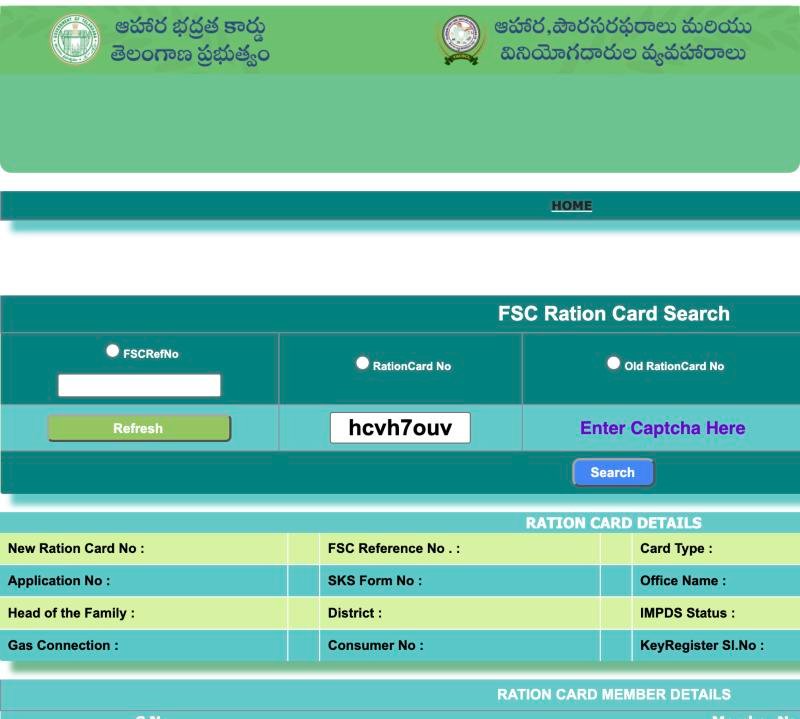
The official FSC Ration Card Search works without an application number. Choose FSCRefNo, Ration Card No or Old Ration Card No, pick the district and type the captcha. The result shows a member table. Compare it with your physical card.
 123456
- 1 Choose FSCRefNo and type it
- 2 or RationCard No
- 3 or Old RationCard No
- 4 Type the captcha shown
- 5 Press Search
- 6 Card details appear here
 12
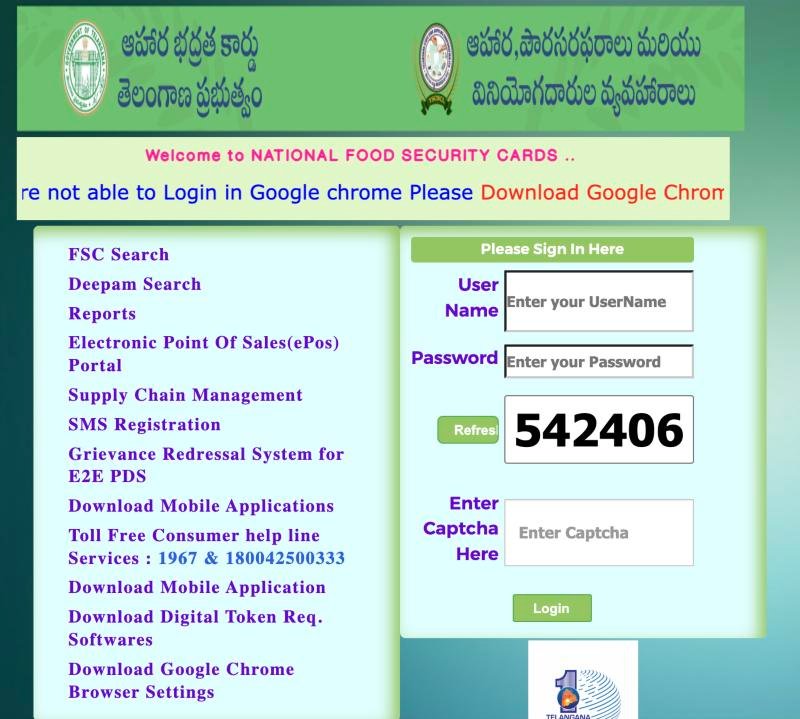
12- 1 Click FSC Search
- 2 Helpline shown on the portal
If you have an open request, the FSC Application Search result can show member status and an Aadhaar No column. It needs a MeeSeva or Application No. See the FSC Application Search guide. Neither form has an eKYC field, so neither can tell you whether a fingerprint will pass. We have not verified what each Member Status value means, so read it aloud to the office.
If a name is absent, read ration card missing in the database or adding a member. If the issue is linking, see Aadhaar not linked to a ration card. If the name is spelt differently from Aadhaar, see name correction.
eKYC Tips for Elders and Parents of Young Children
- Go when the shop is quiet, so the dealer has time to help.
- Wash hands and dry them well, but do not use oil or cream before the scan.
- Let the elder sit down. A steady hand gives a cleaner print.
- Bring the card holder or another listed adult in case one member cannot be read.
- If a child's print will not read, ask the dealer and Civil Supplies what they allow for that child.
None of these tips replaces advice from the office. They only reduce the chance of a failed scan on the day.
Why eKYC Works at One Fair Price Shop but Fails at Another
That pattern points to the shop or the arrangement for collecting away from home, not your finger. Read what to do when a shop refuses under ONORC.
How to Protect Your OTP and Aadhaar During Ration Card eKYC
Scammers use biometric trouble to ask for money. Never share an OTP over the phone. Do not click unknown links promising a quick fix. Do not pay brokers. Do not post photos of your card or Aadhaar online.
The official Food Security Act portal lists the helpline 1967 and 1800 4250 0333 and a grievance system. Keep your card number, shop name and the machine message ready when you call. Our site never asks for Aadhaar numbers or OTPs.
Frequently Asked Questions
Why does my fingerprint fail at the ration shop?
Worn or wet fingers, a dirty scanner, a weak network or a record problem can all cause it. Clean the finger, retry gently once, and ask the dealer for the exact machine message before trying more.
What if only one family member's fingerprint fails?
The problem is probably that member's own record or print. Ask whether another listed member can try, and ask Civil Supplies what is allowed meanwhile. Aadhaar biometric updates happen at an authorised Aadhaar centre.
Can I check eKYC status in FSC search?
The forms we checked on 25 Oct 2026 have no eKYC field. The member list only shows who is on the card. Ask the dealer or the Civil Supplies office about eKYC.
Does a failed scan cancel my ration card?
No, a failed scan alone does not cancel a card. It means the check did not pass at that moment. Check the card and member list online, and call the helpline if the card shows a problem.
What can I do for an elderly person whose print will not read?
Ask the dealer whether another listed member can collect, and ask Civil Supplies if another method is allowed. An Aadhaar biometric update at an authorised centre is a separate step, so ask there first.
Is eKYC compulsory for ration card holders?
We could not verify a current requirement or deadline. Ask Civil Supplies or the helpline whether eKYC applies to your card, and do not trust a caller who claims a deadline.
Someone offers to fix my Aadhaar link if I share an OTP. Should I?
No. Never share an OTP over the phone. Use the helpline, the Civil Supplies office or an authorised Aadhaar centre instead.
Similar guides
Aadhaar Not Linked With Ration Card Telangana
Aadhaar not linked to a ration card in Telangana? Learn linking vs eKYC in plain words, check name spelling and the member list, and get safe official help.
One Nation One Ration Card Telangana
Shop refused your ration away from home under One Nation One Ration Card in Telangana? Record the refusal, check your card and report it with this script.
Ration Card Missing in Database Telangana
Ration card missing in database Telangana? Try FSCRefNo, Ration Card No and Old Ration Card No in the official search, and know who to ask.