Official Telangana links (government sites open in a new tab)
The buttons with ↗ leave this website and open the official portal, which this site does not run. For the rejected card search, open the portal, then FSC Search, then Ration Cards Search, then Status of Rejected Ration Card Search.
| FSC Search Telangana at a glance | |
|---|---|
| What it is | The FSC Search menu on the state EPDS portal. Three official forms sit under it. |
| Card number in hand | FSC Ration Card Search: FSC Ref No, Ration Card No or Old Ration Card No, plus district and captcha. |
| Receipt in hand | FSC Application Search: district plus MeeSeva No or Application No. |
| Card was refused | Status of Rejected Ration Card Search: only the Ration Card No. |
| Only Aadhaar known | No official form has an Aadhaar box. See the Aadhaar guide. |
| Official portal | epds.telangana.gov.in/FoodSecurityAct. Helpline shown there: 1967 and 1800 4250 0333. |
What Is FSC Search?
In Telangana the ration card is officially called the Food Security Card, or FSC. Families use it to buy subsidised grain at fair price shops. FSC Search means the search pages on the state's EPDS (Electronic Public Distribution System) portal.
Two groups of people use it. Some hold a card and want to see its details. Others applied for a new card, a correction or a member change and want to know where the file stands. A few want to know why a request was refused. One menu serves all three.
Open the search on the official Food Security Act portal. This site only explains the steps in plain words. For a tour of the whole portal menu, read the EPDS Telangana portal guide.
How to Do FSC Search: Official Screen Guide
Step 1: Open the official home page
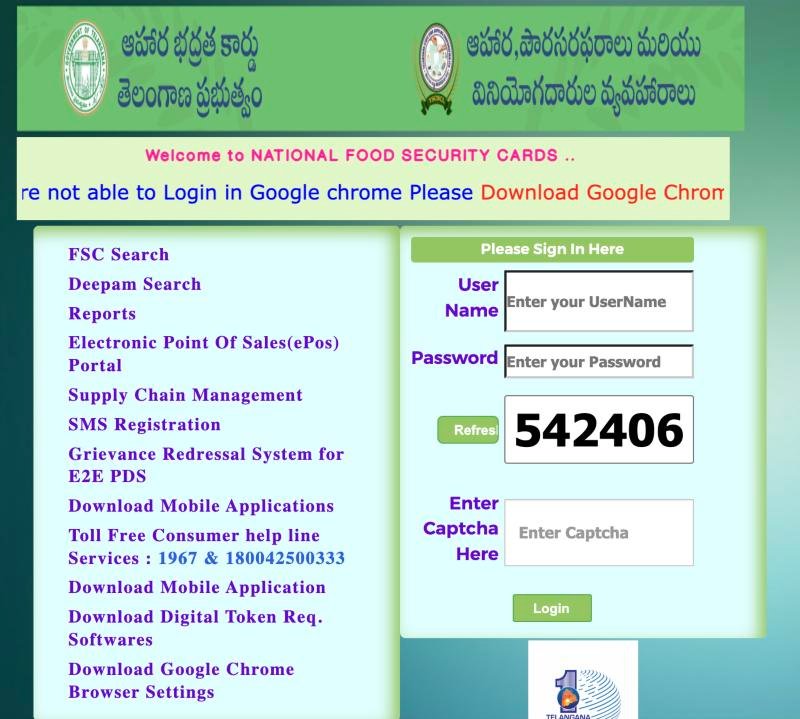
Open the Food Security Act portal in your browser. The left menu starts with FSC Search. The page also shows the helpline numbers 1967 and 1800 4250 0333.
The right side has an official sign-in box with a captcha. It is not needed for the public searches, so leave it empty.
 12
12- 1 Click FSC Search
- 2 Helpline shown on the portal
Step 2: FSC Ration Card Search (for a card number)
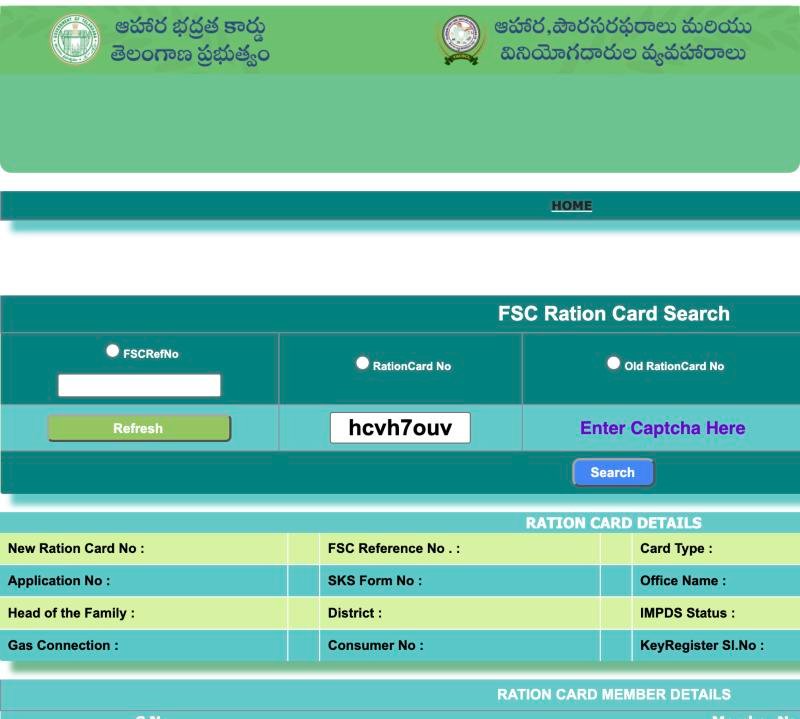
Click FSC Search in the left menu. The page titled FSC Ration Card Search has three radio options: FSCRefNo, RationCard No and Old RationCard No. After you pick one, a Select District dropdown appears with all 33 districts.
Choose the district, type the number and enter the captcha exactly as shown. Press Refresh if it is unreadable. Then press Search.
 123456
- 1 Choose FSCRefNo and type it
- 2 or RationCard No
- 3 or Old RationCard No
- 4 Type the captcha shown
- 5 Press Search
- 6 Card details appear here
Step 3: FSC Application Search (for a receipt number)
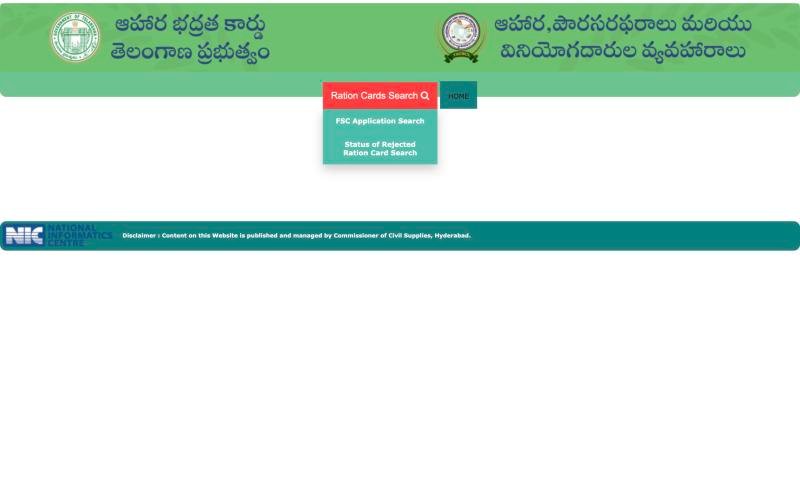
On the same FSC Search page, move the mouse over the Ration Cards Search button. Two options appear: FSC Application Search and Status of Rejected Ration Card Search.
 12
12- 1 Hover Ration Cards Search
- 2 Choose FSC Application Search or Rejected search
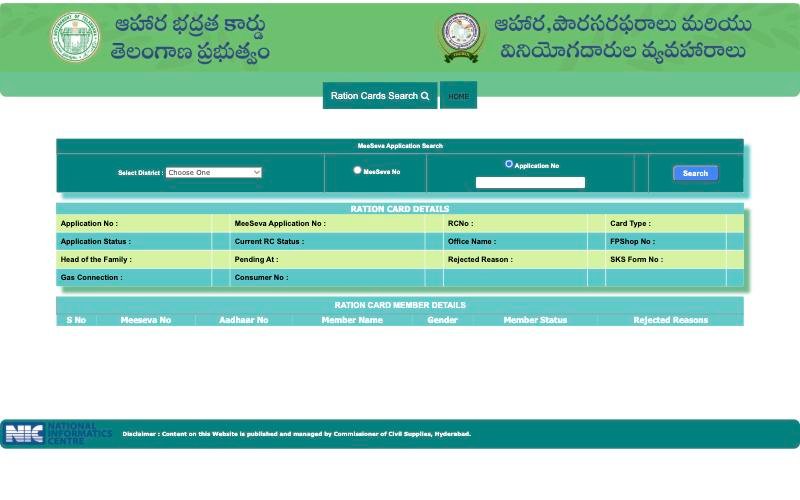
The application form is titled MeeSeva Application Search. Pick your district. Choose MeeSeva No or Application No. Type the number and press Search. Check your receipt or message to see which number it shows.
 12345
12345- 1 Select your district
- 2 Pick MeeSeva No or Application No
- 3 Type the number
- 4 Press Search
- 5 Result fields appear here
The form has no Aadhaar box and no mobile number box. For the full status walkthrough, see FSC application status by MeeSeva number.
Step 4: Status of Rejected Ration Card Search
If a card request was refused, use this third form. It has one field, RationCard No, and a Search button. Old numbers do not work here; use the FSC Ration Card Search for those.
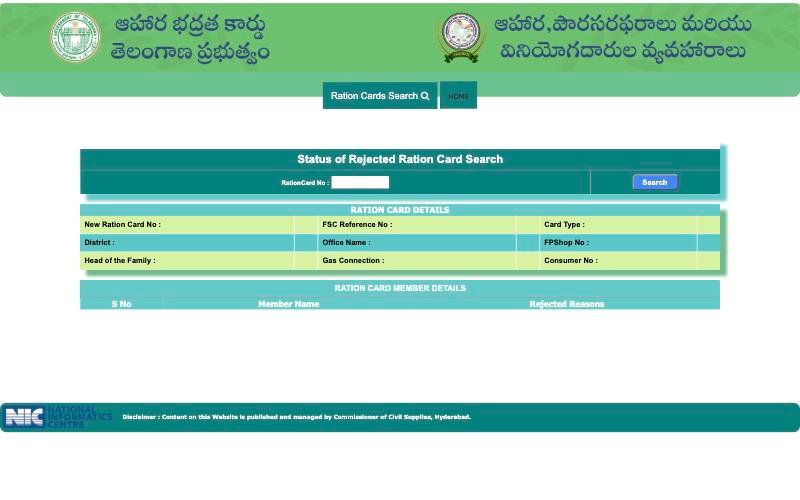 1234
1234- 1 Type RationCard No
- 2 Press Search
- 3 Card details appear here
- 4 Member rejected reasons
The result lists a New Ration Card No and a member table with rejected reasons. Read them with what rejection reasons can mean and how to fix them.
Before you start: a two-minute checklist
- Keep the card, receipt or message in front of you, not only in memory.
- Know the district. For a card, it is the district the card belongs to. For an application, try the district where you applied.
- Use a steady internet connection. The captcha refreshes if the page sits idle for long.
- Open the portal by typing its address or using the button at the top of this page. Do not click search results that only look similar.
- Take a screenshot of the result for your own records.
FSC Ration Card Search or FSC Application Search: what is the difference?
People often mix the two. FSC Ration Card Search is about a card that exists. It answers "what is recorded for this card and who is on it?" FSC Application Search is about a request. It answers "where is my file and was any member refused?" A family with a card and a pending correction may use both, one after the other.
Use the card search when you hold a card number, FSC Ref No or an old number. Use the application search when you hold a receipt. If you hold both kinds of paper, start with the one that matches your question today.
Which Number Do You Need for FSC Search?
The three forms ask for different numbers. Match your paper to the row.
| If you have | Use this form | Also needed |
|---|---|---|
| FSC Ref No | FSC Ration Card Search, FSCRefNo | District and captcha |
| Ration Card No (new number) | FSC Ration Card Search, RationCard No | District and captcha |
| Old Ration Card No | FSC Ration Card Search, Old RationCard No | District and captcha |
| MeeSeva number on a receipt | FSC Application Search, MeeSeva No | District |
| Application number on a receipt | FSC Application Search, Application No | District |
| Ration Card No of a refused request | Status of Rejected Ration Card Search | Nothing else |
Copy the number from the paper digit by digit. One wrong digit gives an empty result.
Worked case. Lakshmi applied at a MeeSeva centre last month and holds only a slip. She opens FSC Application Search, picks the district where she applied, chooses the radio that matches the number printed on the slip, and types it. She does not use FSC Ration Card Search, because she has no card number yet.
What the FSC Search Result Shows
The FSC Ration Card Search result opens a Ration Card Details panel. It shows New Ration Card No, FSC Reference No, Card Type, Application Status, Application No, Office Name, FPShop No, Head of the Family, District, IMPDS Status, Gas Connection, KeyRegister Sl.No and Old RCNo. IMPDS is the national system for grain distribution.
Below it is a Ration Card Member Details table with serial number and member name. Read every row. A missing or misspelt member is easier to fix early.
The FSC Application Search result adds Pending At and Rejected Reason fields. Its member table has Aadhaar No, Member Status and rejected-reason columns. Pending At shows where the application is waiting. We have not verified its possible values, so note the exact wording and ask the office to explain it.
The portal does not show a processing time. Ask the MeeSeva centre or office how long your request type normally takes.
Sample result row. The row below is an illustration of how to read a result. It is not a real record.
| Field | Example value | How to read it |
|---|---|---|
| Application Status | Rejected | Open the rejected search and read the reason for each member. |
| Pending At | An office name | The file is waiting there. Note the exact wording and ask the office to explain it. |
| Head of the Family | Spelling differs from your papers | Ask about a correction before you apply for anything new. |
| IMPDS Status | Shown in the card panel | Ask the Civil Supplies office what the value means for your card. |
Compare Head of the Family, member names and the FP shop number with your physical card. If any of them differs, you have found what to correct.
Mistakes that cause empty results, form by form
| Form | Common slip | Fix |
|---|---|---|
| FSC Ration Card Search | An old card number typed under RationCard No, or the reverse | Pick the radio that matches the number printed on the card, then search again. |
| FSC Ration Card Search | Captcha typed in the wrong case | Type it exactly as shown, or press Refresh for a new one. |
| FSC Application Search | MeeSeva No and Application No swapped | Check which number your receipt shows and switch the radio. |
| FSC Application Search | Wrong district chosen | Try the district where you applied. If no record appears, ask the office. |
| Rejected search | An FSC Ref No typed into the box | This form takes only the Ration Card No. Use the card search for other numbers. |
If a member table shows a name spelt differently from the card or the identity papers, treat that as a correction request, not a search problem. The search page only displays what is stored. It cannot fix it.
Keep a note of every search you try: the form, the radio option, the district and the date. If you later visit the office, this short list saves time because the staff can see exactly what you already checked.
FSC Status Search: How to Check Your Card or Application Status (With Photos)
When people type fsc status search or fsc search status in Google, they usually want one of three answers. Is my card there? Where is my application? Why was my request refused? The official portal has a separate form for each one, so the first job is to pick the right form.
| What you want to know | Form to use | Status fields you will see |
|---|---|---|
| Card details and card status | FSC Ration Card Search | Card Type, Application Status, IMPDS Status |
| Where my application is | FSC Application Search | Application Status, Current RC Status, Pending At |
| Why a request was refused | Status of Rejected Ration Card Search | Rejected Reasons for each member |
Step 1: Match the form to the number in your hand
A card number, FSC Ref No or old card number goes into the first form. A MeeSeva or Application number goes into the second. A refused request is checked with the Ration Card No in the third. Using the wrong form is the most common reason people think their status is missing.
Step 2: Check the status of a card
Open the FSC Ration Card Search, pick one of the three radio options, choose your district, type the captcha and press Search. The result panel shows the card type and an Application Status field along with the shop number and family details.
123- 1 Pick FSCRefNo, Ration Card No or Old Ration Card No
- 2 Press Search
- 3 Read card type and Application Status here
Step 3: Check the status of an application
In the FSC Application Search, choose your district, pick MeeSeva No or Application No, type the number and press Search. Four fields tell you the story: Application Status, Current RC Status, Pending At and Rejected Reason.
1234- 1 Application Status
- 2 Current RC Status
- 3 Pending At
- 4 Rejected Reason
Step 4: Read the words exactly as shown
The portal does not explain the possible values, and we have not verified them, so do not rely on guesses from other websites. Copy the exact wording of each field into your phone notes with the date. If a word is unclear, show the screenshot at the MeeSeva centre or the Civil Supplies office and ask what it means for your file.
Step 5: If the status points to a refusal
Open the Status of Rejected Ration Card Search and read the reason against each member. Then follow rejected ration card reasons and fixes. If the status simply does not change, our guide on an application that stays pending shows what to note and whom to ask.
1234- 1 Type RationCard No
- 2 Press Search
- 3 Card details appear here
- 4 Member rejected reasons
Tip: take a screenshot of every status result. When you check again later, you can compare the two screens and see whether anything really changed.
What to Do if FSC Search Shows No Record: Step-by-Step Guide With Photos
A no record message does not by itself mean your application was rejected. Often it is a small slip in what was typed or chosen. Work through these steps in order, and check each one against the form below.
1234- 1 Check 1: district where you applied
- 2 Check 2: radio matches the number you hold
- 3 Check 3: retype the number, no spaces
- 4 Then press Search again
- Check the district. Try the district where you applied. If no record appears, ask the office.
- Match the number type. A MeeSeva number typed under Application No, or the reverse, is an easy mistake. Check your receipt or message to see which number it shows.
- Retype carefully. Remove spaces. Look for a letter O typed for zero or a small L for one. Copy from the paper, not from memory.
- Try the other radio once. If the slip shows two numbers, try each once. Do not refresh again and again.
- Try the rejected search. If you were told the request was refused, use the rejected form with the Ration Card No.
- Check again later. A very new application may not show yet. Do not file a second application just because the first is not visible.
- Ask the office. Take the receipt, a photo of it and identity papers to the MeeSeva centre or the Civil Supplies office. Ask them to check the record.
1234- 1 Type RationCard No
- 2 Press Search
- 3 Card details appear here
- 4 Member rejected reasons
| What you see | Likely cause | Next page |
|---|---|---|
| No record for a new application | Wrong district, number type or a typing slip | Steps 1 to 4, then application status data not found |
| No record, but you hold an old card | The card may be missing from the online data | ration card missing from the database |
| Application stays pending | The file is waiting at an office | application pending too long |
| Rejected search shows a reason | A detail or document problem | rejection reasons and fixes |
Mini-case. Ravi searched with his MeeSeva number and got no record. He had picked Application No by mistake. He switched the radio to MeeSeva No, kept the same district and got a result. Before you assume the file is missing, change one thing at a time and search again.
What to say at the office. Keep it short: "I applied on this date at this centre. This is my receipt. The portal shows no record. Can you check the file and tell me which number to track it with?" Write down the answer, the date and the name of the person.
How to Find a Lost MeeSeva or Application Number
The application search accepts only a MeeSeva No or an Application No, so the receipt is the key to FSC application status. Follow this photo guide.
Step 1: Know which number the form wants
The form has two radio choices, MeeSeva No and Application No. Your paper may show one or both. Check your receipt or message to see which number it shows.
123- 1 MeeSeva No: number from your MeeSeva receipt
- 2 Application No: number from your application slip or message
- 3 After the search, check this field against your slip
Step 2: Try these in order
- Look for a photo of the receipt on your phone or in family chats.
- Check old messages and papers from the day you applied.
- Ask the MeeSeva centre where you applied to look up the number.
- Visit the local Civil Supplies office with your identity papers and ask for help.
Step 3: Ask the official helpline if you are stuck
The official home page shows a toll-free helpline, 1967 and 1800 4250 0333. Note the date and the name of the person who helps you.
1- 1 Helpline listed on the official page: confirm the number there before calling
Step 4: Search and cross-check
Once you have the number, search and compare the result with your slip. If you lost a card number rather than a receipt, the FSC Ration Card Search also accepts the FSC Ref No or the Old Ration Card No, so check old cards, gas papers and shop slips for any of the three. Do not pay anyone who says they can find a number for money.
FSC Search With Aadhaar No: Step-by-Step Guide With Photos
People type fsc search with aadhaar no hoping to open a card with only an Aadhaar number. Follow the official screens below and you will see exactly what the portal offers. None of the three official forms we opened on 25 October 2026 has an Aadhaar box or a name box. The full explanation is on our page FSC search with Aadhaar no.
Step 1: Open the official home page
Go to the official Food Security Act portal. Do not use the sign-in box; it is not needed for the public searches.
12- 1 Click FSC Search
- 2 Helpline shown on the portal
Step 2: Open FSC Search and the Ration Cards Search menu
Click FSC Search, then move the mouse over Ration Cards Search. Two options appear: FSC Application Search and Status of Rejected Ration Card Search.
12- 1 Hover Ration Cards Search
- 2 Choose FSC Application Search or Rejected search
Step 3: Look for an Aadhaar box on the form
Open FSC Application Search. The form asks only for the district and a MeeSeva No or Application No. The member table in the result has an Aadhaar No column, which you read after a search; you cannot search with it.
123- 1 The only inputs are District...
- 2 ...and MeeSeva No or Application No
- 3 Aadhaar No shows only as a result column, not as a search box
Step 4: Use the number the forms accept
- Card number, FSC Ref No or old card number: FSC Ration Card Search.
- MeeSeva receipt: choose MeeSeva No. Application slip or message: choose Application No.
- Refused request: Status of Rejected Ration Card Search with the Ration Card No.
If you only remember Aadhaar, first find the lost number. If a member shows as not linked, read Aadhaar not linked to the ration card. Never type Aadhaar or OTP on other websites or give them to an agent.
Applying, Corrections and Member Changes: Step-by-Step Guide With Photos
The FSC search pages only show a status; they cannot change anything. To apply for a new Food Security Card, make a ration card correction or handle a member change, use the official process and confirm where to apply with the MeeSeva centre or Civil Supplies office. Then track the file with your receipt number.
Step 1: Decide which service you need
| Your situation | Service to ask for | Read this guide |
|---|---|---|
| You have no card yet | New Food Security Card application | EPDS Telangana guide |
| Name, address, age or gender is wrong | Correction in the existing card | Ration card correction |
| A baby is born or a spouse joins | Member addition | Member addition |
| A member or the whole family moves | Transfer or member migration | Transfer and migration |
Step 2: Keep your papers ready
The list depends on the service and may change, so ask for the current one. Carry your card number if you have it, identity papers of the people concerned, and a photo of each paper on your phone as a backup.
Step 3: Apply and keep the receipt
Photograph the MeeSeva No or Application No before you leave the centre. Do not pay anyone who says approval is guaranteed.
Step 4: Track the application on the official portal
Open FSC Search, then Ration Cards Search, and choose FSC Application Search.
12- 1 Hover Ration Cards Search
- 2 Choose FSC Application Search or Rejected search
Step 5: Enter your receipt number and read the result
Pick the district, choose MeeSeva No or Application No, type the number and press Search. Then read Application Status, Current RC Status and Pending At. Their detailed meaning is on FSC application search.
1234- 1 1 Choose the district where you applied
- 2 2 Choose MeeSeva No from your receipt
- 3 3 Type the receipt number
- 4 4 Read Application Status, Current RC Status and Pending At
Step 6: If the file is refused
Open Status of Rejected Ration Card Search and read the Rejected Reasons for each member. Fix the reason named there before you apply again. See rejected ration card reasons and fixes.
1234- 1 Type RationCard No
- 2 Press Search
- 3 Card details appear here
- 4 Member rejected reasons
Step 7: If the file stays pending or the record is missing
Do not file the same request twice. Read application pending too long or ration card missing from the database, and visit the office with your receipt.
After the card works, two problems appear at the shop. For fingerprint trouble, read eKYC and fingerprint failure. If a dealer refuses grain away from your home shop, see shop refusal under One Nation One Ration Card.
Where to go next
| Your question | Read |
|---|---|
| How the portal menu works and what else it offers | EPDS Telangana portal guide |
| Reading an application result in detail | FSC application search |
| Searching when you only remember Aadhaar | FSC search with Aadhaar no |
| Rejected request | Rejected reasons and fixes |
| Everything else | All guides |
Who Is Eligible for a Food Security Card?
Eligibility for a Food Security Card is decided by the Telangana government, and the rules can change. We do not list income limits or categories because we could not verify them on the portal. In general, the card is meant for households that meet the state's criteria and live in the state. Ask the Civil Supplies office or a MeeSeva centre for the current rules before you apply. Our EPDS Telangana guide has more general notes.
Documents People Usually Keep Ready
The exact list depends on the service and may change, so confirm it locally. Most families keep these ready:
- Identity proof of the head of the family and of each member.
- Address proof of the household.
- The old ration card and its number, if you have one.
- For a baby or a spouse, a birth or marriage paper, if asked.
- A photo of every paper on your phone, as a backup.
Hand these papers only to the MeeSeva centre or the official office, never to a stranger who offers to apply for you.
Mobile Apps and Other Services on the Official Portal
The official home page also lists Download Mobile Applications, the Electronic Point Of Sales (ePoS) Portal (the fingerprint machine system at the shop), Supply Chain Management, SMS Registration and the Grievance Redressal System for E2E PDS. We have not checked what each of them contains, and we have not verified the names of individual apps. Open the link on the official page and install apps only from the store listing it names. Our EPDS Telangana guide lists every menu item.
Official Portals You Can Trust
| Portal | Use it for |
|---|---|
| Telangana Food Security Act portal | FSC Ration Card Search, FSC Application Search and the rejected card search |
| National Food Security Act portal (nfsa.gov.in) | National-level information |
| IMPDS portal (impds.nic.in) | National portal for the Integrated Management of Public Distribution System; it opened when we tested |
| Tamil Nadu PDS (tnpds.gov.in) and Maharashtra RCMS (rcms.mahafood.gov.in) | Other states' ration card portals, if you moved from Telangana; both opened when we tested |
| Toll-free helpline shown on the official page | Consumer help: 1967 and 1800 4250 0333, as displayed on the portal home page |
Check that the address ends in .gov.in or .nic.in. Look-alike websites exist. For Andhra Pradesh, Karnataka and other states, start from nfsa.gov.in, because we could not open every state portal when we tested.
Common Reasons the FSC Search May Not Work
- The wrong option is selected: FSC Ref No, Ration Card No or Old Ration Card No.
- The district is not the one where the card or application belongs.
- The captcha was typed wrongly; use Refresh if it is unclear.
- An old card number was typed in the new number box, or the other way round.
- The application is very new, or the card is missing from the online data.
Our data not found guide and the missing record guide take you through the fixes.
Tips for Finding FSC Details Online
- Keep your number, district and receipt in front of you before you start.
- Use Google Chrome on a phone or computer; the official page itself links Chrome settings.
- Type the captcha exactly as shown, including capital and small letters.
- Take a screenshot of the result for your records.
- Never share Aadhaar or OTP with anyone who offers to search for you.
Conclusion
The quickest way to do an FSC search in Telangana is to pick the right official form for what you hold: a card number for FSC Ration Card Search, a MeeSeva or application number for FSC Application Search, or a ration card number for the rejected card search. This site only explains the steps. For every search, go to the official portal and keep your details safe.
Safety Note
Never share an OTP over the phone, and never pay anyone who promises approval or a "fixed" record. The real searches need only a district and a number. Check the web address, not the page text: official portals end in .gov.in or .nic.in.
Frequently Asked Questions
What is FSC Search in Telangana?
FSC Search is the menu on the official EPDS Telangana portal that leads to three search forms: FSC Ration Card Search, FSC Application Search and Status of Rejected Ration Card Search. This website is independent. It explains the steps but does not run the portal or approve any card.
Is FSC search free?
The three official forms we opened on 25 October 2026 have no payment step. If a website or agent asks you to pay just to search, stop and use the official portal. Fees for applying through MeeSeva may differ, so confirm them at the centre.
FSC Search With Aadhaar No Telangana: What Is True?
None of the three official forms has an Aadhaar box. Search with an FSC Ref No, Ration Card No or Old Ration Card No, or with a MeeSeva or Application No from your receipt. Never type Aadhaar or an OTP on other websites that claim to search for you.
Can I see the other members of my family in the search?
Yes. The FSC Ration Card Search result has a Ration Card Member Details table listing the members on the card. The application search result also shows member status and rejected reasons, but it needs a MeeSeva or Application No. If a member is missing, read the member addition guide.
Can I do FSC search on my mobile?
Yes. The official pages open in a phone browser. The portal links Chrome browser settings, so try Chrome if a menu or dropdown fails. Hover menus can be hard on a phone, so use the desktop-site option and retry later if the portal is busy.
Is there an FSC search for Andhra Pradesh (FSC search AP)?
This website covers only the Telangana Food Security Act portal. Andhra Pradesh runs its own ration card system, and we do not give steps for it. Search for the Andhra Pradesh civil supplies portal and check that its address ends in .gov.in or .nic.in.
Why does FSC search say no record found?
Common causes are a typing mistake, the wrong district, the wrong number type, or a very new application. Recheck each point, then check again later. If it still fails, take your receipt to the MeeSeva centre or Civil Supplies office and ask them to check the record.
How can I see why my ration card was rejected?
Use Status of Rejected Ration Card Search. Enter only the Ration Card No and press Search. The member table lists rejected reasons. Note the reason, collect corrected papers and ask the Civil Supplies office what is needed. Do not pay anyone for guaranteed approval.